
Managing workflows and checking runs
Once a workflow is published, it runs on its own. This article covers managing your workflows and checking exactly what each run did. To build a workflow, see Creating a workflow.
Find your workflows
Go to Automations > Workflows. The All tab lists your workflows with their number of runs, status (Draft or Active), who created them, when they were last published and when a run last failed. Archived workflows are in the Archived tab.
Hover over a workflow's name for a quick summary: what triggers it, its total runs and its failed runs.
Manage a workflow
Click ⋮ at the end of a workflow's row:
- Edit: open the workflow.
- Duplicate workflow: copy it, to build a similar one quickly.
- Archive workflow: move it to the Archived tab.
- Delete: remove it for good.
Workflows that have already run can't be deleted. Archive them instead. Only workflows that have never run, like drafts, can be deleted.
Check what a workflow did
Open the workflow and click Runs at the top.
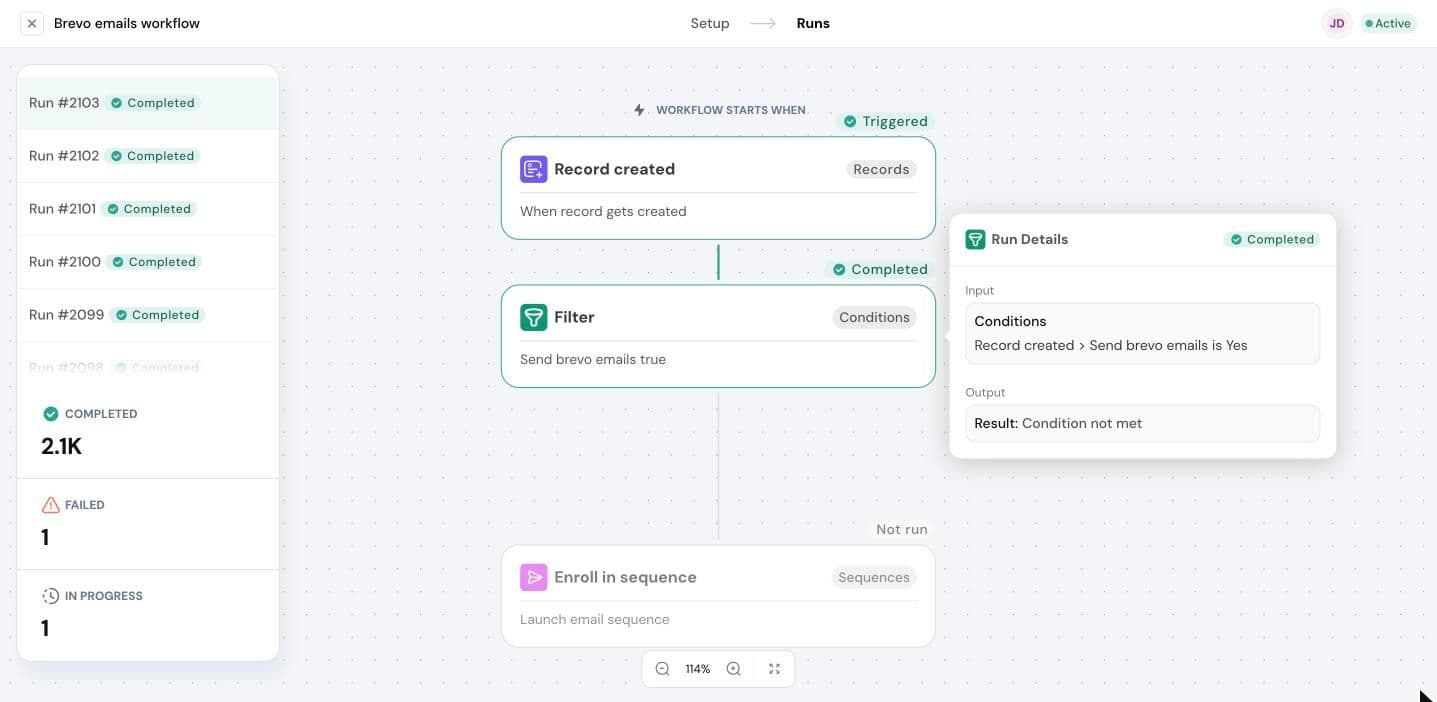
- The list on the left shows every run, newest first, with its status. Below it are totals for Completed, Failed and In progress runs.
- Click a run to see it on the canvas. Each block shows what happened: Triggered, Completed or Not run.
- Click a block to open Run Details. It shows the block's Input, what it was given, and Output, what it produced.
To go back to building, click Setup.
Why didn't my workflow do anything?
- A block says Not run. Open the block before it. If it's a condition, its Run Details may say Condition not met. That's expected: the record didn't match, so the workflow stopped or took the other path.
- The workflow has no runs. Check that it's Active, not Draft, and that the trigger matches what happened. For example, a Record updated trigger set to one field only runs when that field changes.
- A run failed. Open the run and find the block that failed. Its Run Details show the input it received, which usually points to the problem, like a missing value.
Need help?
Reach out to us at [email protected].
Was this helpful?