
Set up enrichment and scoring
For Admins and Super Admins. If you're a rep, your admin sets this up for you.
Enrichment fills in contact and company details for you. Scoring tells your team which records to focus on. Both are set up once for the whole workspace.
Set up data enrichment
Enrichment uses enrichment credits.
- Go to Settings > Data Enrichment.
- Turn on Enrich using SparrowCRM.
- To cap how many credits each person can use, set a Usage limit.
- Under Configure Enrichment, choose what gets enriched:
- Automatically enrich records upon creation: new contacts and companies are enriched as soon as they're added.
- Allow users to enrich records for bulk operations: records added through imports and migrations are enriched too. This uses more credits.
- Allow Phone number enrichment: costs 9 credits per record and can only be run manually.
- Under Role-based permissions for data enrichment, click Edit permissions to choose which roles can enrich records.
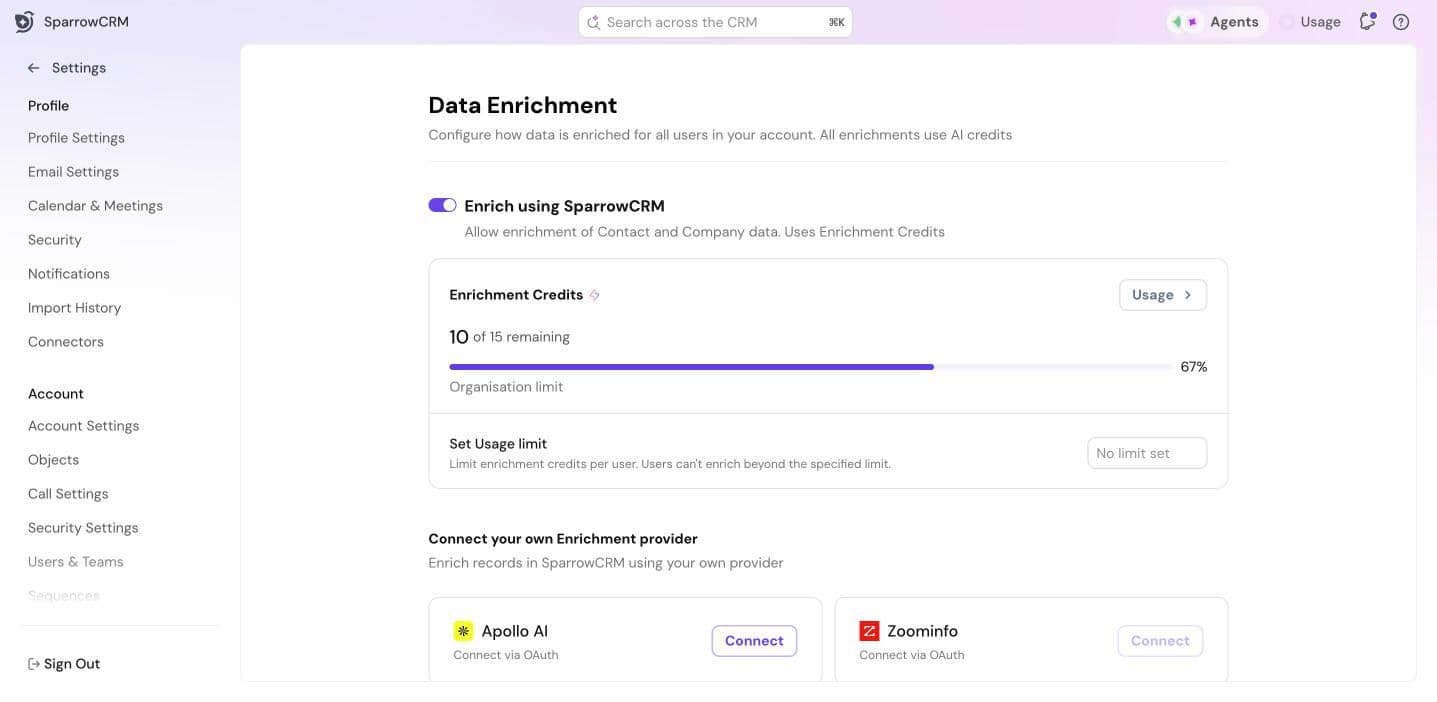
Use your own enrichment provider
If you already use Apollo AI or ZoomInfo, you can enrich records with it instead.
- Under Connect your own Enrichment provider, click Connect next to your provider and sign in.
- Under Default provider, choose which provider is used for automatic enrichment.
For the full list of fields enrichment fills in, see Data Enrichment.
Set up AI scoring
AI Scoring scores your records on ICP fit, engagement, deals and meetings, so your team knows where to focus.
- Go to Settings > AI Scoring.
- [Setup steps to be added]
If AI Scoring isn't included in your plan, you'll see an option to upgrade.
Next step
Set up automations: workflows, sequences and Smart Router.
Need help?
Reach out to us at [email protected].
Was this helpful?